
Context
This week I focused on creating a rugby highlights package in Adobe Premiere Pro. I was given match footage and had to turn it into a shorter, engaging package containing the most important moments, including tries, conversions and replays.
My target audience was sports fans aged around 16–30, particularly people who consume match highlights online rather than watching an entire fixture. so I wanted my package to be quick, clear and visually engaging, while still allowing viewers to understand how the match developed.
Research
Technical
I used Adobe Premiere Pro because the task required detailed video editing. I needed to select specific pieces of match action, trim clips precisely, create replays and control the overall pacing of the package.
Premiere Pro’s timeline allowed me to work with the match footage and audio together while making precise cuts around important moments.
I also researched Premiere’s tools for changing clip speed because slower replays can allow the audience to see an important piece of action in greater detail.
Story
My interpretation of the brief was to create a package that allowed somebody who had not watched the full match to understand the most significant action.
So, tries and conversions became key points in the story because they changed the score and showed how the match progressed.
I looked at professional rugby coverage to understand which moments broadcasters prioritise. I used sources such as BBC Sport for rugby reporting and World Rugby for inspiration, for example:
Looking at both helped me avoid basing my decisions on only one type of sports coverage.
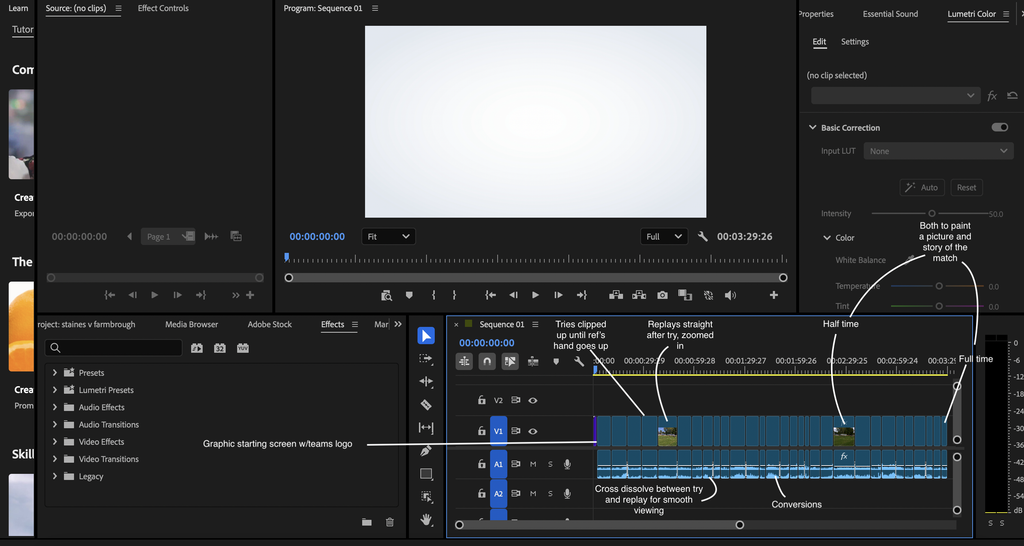
My final sequence therefore focused on action, then the result of the action, followed by a replay and then a conversion, creating a clear progression through the match. I also included the kick-off, half-time, and full time to create a full picture of the match
Stylistic
My main stylistic influence was professional broadcast rugby highlights.
I noticed that sports highlights don’t give every moment equal screen time. Important moments are given greater emphasis, often through replays, while less significant sections are removed completely.
I wanted to recreate this broadcast feel by keeping the package fast-paced without making it difficult to follow. After a try, for example, I allowed enough time for the viewer to understand what had happened before moving into the replay or conversion.
Problem Solving
| Problems | Solutions |
| The original match contained more footage than I needed for a highlights package. | I reviewed the footage and focused on tries and conversions, removing sections that didn’t contribute to the story of the match. |
| Repeating a clip could look like an editing mistake if the audience couldn’t immediately tell it was a replay. | Placed replays after the original action and adjusted their timing whilst also adding a cross dissolve to ensure it’s clearly a replay |
| Cutting too quickly made the action difficult to understand but leaving clips too long made the package lose energy. | I repeatedly watched sections back and adjusted my in and out points until there was enough context around each important moment without unnecessary footage. |
Planning & Production
Pre-production/planning
Before beginning the main edit, I watched through the match footage and identified the most important moments. I planned the package around the tries and conversions, then identified which moments deserved replays.
This meant I entered the detailed editing stage with a clearer structure rather than making random cuts as I moved through the footage.
Production
I wasn’t responsible for filming the original rugby match, so all i did was post-production.
Post-Production
I imported the footage into Adobe Premiere Pro and began creating the highlights package.
- Cut unnecessary sections between major events.
- Included the tries and conversions.
- Created replays of all the tries.
- Adjusted replay timing to make important action easier to see.
- Watched the sequence repeatedly to check that the match was still understandable after shortening it.
Distribution
This highlight package would be distributed through YouTube or a sports broadcaster’s digital platforms.
YouTube would be the most relevant because sports fans can use highlights to catch up on important action without watching an entire match.
Practical Skills
This week developed my sports video editing skills in Premiere Pro, especially my ability to turn long form match footage into a focused package.
Evaluation & Reflection
| What Went Well | Even Better If |
| Successfully selected the important tries and conversions so the audience could understand the key events without seeing the entire match. | I could experiment further with replay speed and transitions to make the difference between live action and replay even clearer. |
| Adding replays gave moments more emphasis and helped the package resemble professional sports highlights. | spend more time balancing music and crowd audio so the sound adds more energy to important moments. |
| I became more confident making precise cuts, organising a longer sequence and controlling the pacing of sports footage. | I could be more selective with the footage immediately before and after each scoring moment, keeping enough context without allowing the package to become too long. |