
Context
This week, I produced a tutorial video focused on core video production skills: scene selection, lighting, audio, and framing. The brief was to create an educational piece that clearly demonstrates how professional techniques improve video quality, using practical examples rather than theory.
The tutorial is aimed at aspiring content creators aged 15–25, particularly those who want quick, usable advice for platforms like YouTube. This demographic often consumes short, fast-paced educational content and prefers learning through visual comparison rather than long explanations.
The tutorial included “Good vs. Bad” demonstrations, allowing viewers to instantly see how changes in lighting, scene selection, framing, or audio quality affect the final result. I used clear language, short explanations, and quick transitions to keep attention high throughout the video.
Research
Technical
For this project, I researched how to produce a clear and professional tutorial video using accessible equipment. I focused on:
- camera placement and framing
- basic lighting setups
- microphone positioning
- recording clean audio in non-studio environments
I used my iPhone 15 camera, basic lighting, and an external microphone, which are realistic tools for beginner creators.
Research from YouTube Creator Academy and beginner filmmaking guides shows that creators can achieve professional-looking results using simple equipment if it is used correctly. This supported my decision to focus on technique over expensive gear, making the tutorial more relatable and useful.
Story
My interpretation of the brief was to teach production skills in a way that feels visual, practical, and easy to understand. Instead of explaining concepts in long detail, I structured the video so each section followed this pattern:
- Poor example
- Improved version
- Short explanation of why the second version is better
I researched how popular tutorial creators structure their videos and noticed that audiences respond well when mistakes are shown first. This makes the improvement more obvious and keeps viewers engaged. I adapted this by:
- keeping explanations short
- demonstrating mistakes intentionally
- showing instant improvements
Style
Stylistically, I based the tutorial on YouTube education content aimed at young creators. This includes fast pacing, clear visual comparisons, direct address, and simple explanations.
Bearing my audience in mind, I avoided sounding too formal or academic. Instead, I used conversational language and clear visual cues so the tutorial feels approachable and easy to follow.
The overall style is designed to feel like a quick, helpful guide that viewers could pause, copy, and apply to their own videos immediately.
Practical Skills
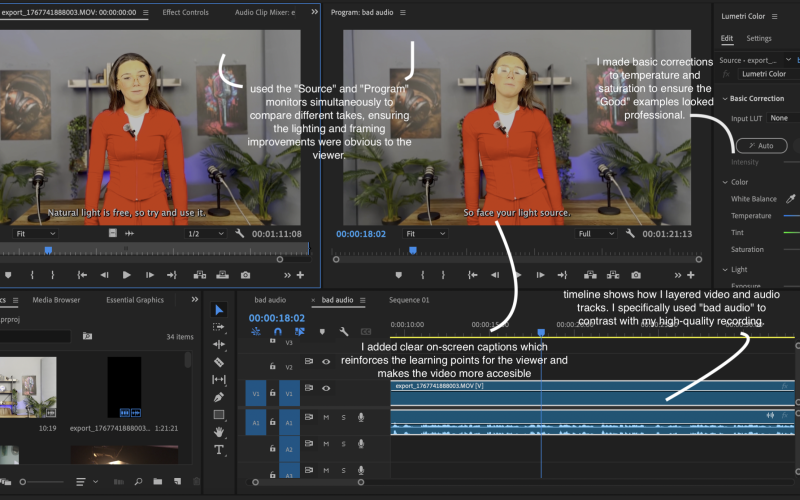
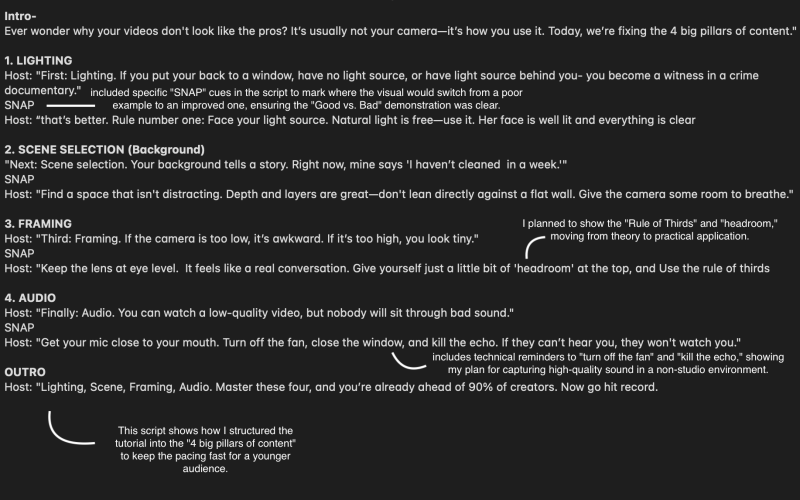
This project allowed me to develop a range of practical production skills such as planning, filming, lighting setup, audio testing, framing and editing
Here is an example of the work i did:
Evaluation and Reflection
What Went Well:
- The “Good vs. Bad” examples made the learning points easy to understand quickly.
- The pacing and tone suited young creators and matched typical YouTube tutorial formats.
- The tutorial provided advice that viewers could immediately apply using basic equipment.
Even Better If:
- Adding brief labels or keywords could reinforce the learning points further
- Breaking the tutorial into even smaller segments could improve retention.
- Sharing the video with beginner creators before final upload could help refine clarity and pacing.
Leave a Reply