
Context
This week I produced another rugby highlights package, this time editing Staines vs Woking in Adobe Premiere Pro. The task built on the skills I developed last week, but gave me another opportunity to improve my judgement when selecting match action, constructing replays and controlling the pace of a sports edit.
My target audience was rugby and general sports fans aged approximately 16-30 who want to catch up on the key moments of a fixture without watching the entire match.
Research
Technical
I continued using Adobe Premiere Pro because I was already familiar with the workflow from the previous rugby task and wanted to develop my skills further rather than change software.
Premiere allowed me to make accurate cuts around the match action, arrange the package on the timeline and create replay sequences.
One area I wanted to improve was my control over replays. Premiere’s speed controls allow individual clips to be slowed down or adjusted without affecting the rest of the sequence.
Story
Although this was another rugby highlights task, I didn’t want to approach it as simply repeating my previous edit.
The story this time was specifically the progression of the Staines vs Woking match. I needed to identify which moments actually helped the viewer understand how the fixture developed, rather than including action simply because it looked interesting. I prioritised the scoring moments, build up to important plays, conversions and reactions.
I referred to professional rugby coverage from BBC Sport and World Rugby to look at how matches are reduced into shorter reports and highlights.
World Rugby is the sport’s international governing body and therefore provides an official perspective, whereas BBC Sport approaches matches journalistically for a wider audience. Comparing them helped me think about the difference between documenting everything that happened and selecting what the audience actually needs to understand the match.
Stylistic
My stylistic reference remained professional broadcast rugby coverage, but this week I paid more attention to the rhythm between normal match action and the major moments.
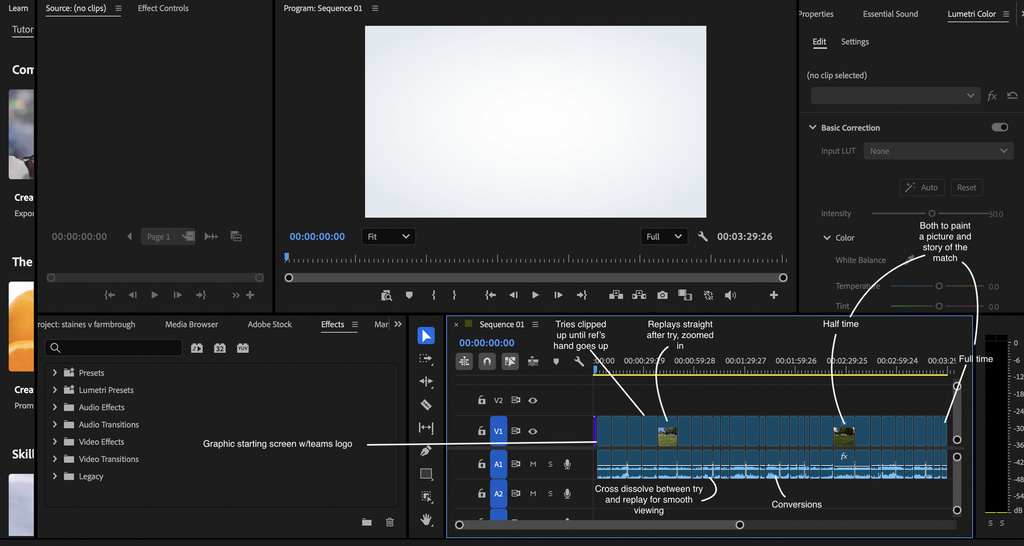
Instead of making every cut equally fast, I wanted the package to build towards scoring moments. The pace could increase through the build up, before giving the try slightly more space and then showing a replay.
I also wanted the edit to feel clean rather than overly produced. Rugby already contains movement, crowd sound and physical action, so unnecessary transitions or effects could distract from what was happening.
This style suits my younger sports audience because it delivers the most important information quickly while maintaining enough context to understand the match.
Problem Solving
| Problems | Solutions |
| Choosing how much build up to keep | kept selected pieces of buildup before important moments while removing sections that didn’t contribute to the attack. |
| Avoiding repetitive replays | adjusted the length and timing of the replays depending on the action, giving more screen time to moments where seeing the movement again. |
| Working more efficiently | found significant moments first and then returned to make detailed cuts rather than trying to perfect every section immediately. |
Planning & Production
Pre-production/planning
Before creating the final sequence, I looked through the Staines vs Woking footage and identified the major scoring moments.
I considered which clips would form the essential structure of the package and which would work as additional context. This made the timeline easier to build because I already understood the approximate order of the important moments.
Production
I wasn’t involved in recording the original match, so there was no traditional production stage for me.
Post-Production
I edited the package in Adobe Premiere Pro, using what I learned from the previous rugby exercise while trying to make my workflow more efficient.
I selected the main scoring opportunities, trimmed unnecessary match time and arranged the important events into a clear sequence. I then created replays for selected moments and refined the timing between the original action, replay and following play.
I also repeatedly watched the sequence as a complete package rather than only reviewing individual clips. This helped me identify places where the edit lost momentum or moved too quickly.
Distribution
The final package was produced for digital sports coverage and YouTube.
A highlights format gives viewers a quicker way of experiencing the match while still understanding its major events, making it suitable for audiences consuming sport online.
Practical Skills
This week I became more confident deciding what not to include. Rather than viewing every piece of match footage as equally important, I considered whether each section contributed to the viewer’s understanding of the fixture.
Evaluation & Reflection
| What Went Well | Even Better If |
| Having already completed a rugby highlights package, I was quicker at identifying significant footage and building my initial sequence. | I could make greater use of crowd and match audio to increase the impact of tries and other major moments. |
| I became more confident deciding how much build up was necessary before a try or conversion rather than simply including every piece of action. | I could test different speeds or alternative available angles to make certain replays feel closer to professional broadcast coverage. |
| My replays felt more purposeful because I considered what the audience needed to see again and adjusted their length accordingly. | Some sections between major events could still be shortened further so the package maintains energy from beginning to end. |